Forking and Cloning a Repository
We develop our projects on GitHub, which is a platform for hosting and collaborating on code. In order to run our projects yourself, you will need a local copy of the relevant repository on your computer.
As you do not have write access directly to our repositories, you will first need to create a fork of the repository, which is your own repository on GitHub. This will allow you to push changes to a branch on your fork, and create a pull request to propose your changes to the main repository.
After you have created a fork, you will then need to clone the repository to your computer, which is the process of downloading the repository from GitHub to your local machine. You will need Git installed on your computer to do this.
The following will use the Sir-Lancebot repository as an example, but the steps are the same for all other repositories.
See our working with Git guide for more information on how to work with Git.
Forking a Repository
Note: Members of the Python Discord staff can create feature branches directly on the repository without forking it.
- Navigate to the repository page on GitHub and press the
Forkbutton at the top of the page.
- Fork it to your account.

- Later, you will need the Git URL of your forked repository in order to clone it.
In your newly forked repository, copy the Git URL by clicking the green
Codebutton, then click the Copy Link button.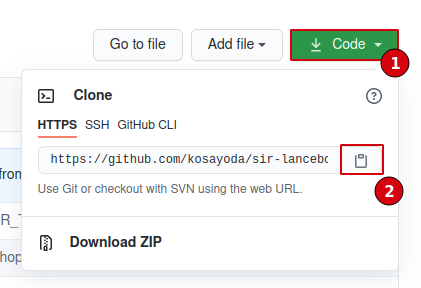
If you have SSH set up with GitHub, you may instead click the
SSHbutton above the Copy Link button to get the SSH URL.
Cloning a Repository
You can clone a repository using the command line directly, or by using your IDEs built-in Git integration. We will cover how to do this with the command line, and with PyCharm's integration.
Cloning with the command line
- Clone your forked repository using
git clonefollowed by your fork's Git URL. Then, change your working directory to the repository.
$ git clone https://github.com/<your username>/sir-lancebot
...
$ cd sir-lancebot
Cloning with PyCharm
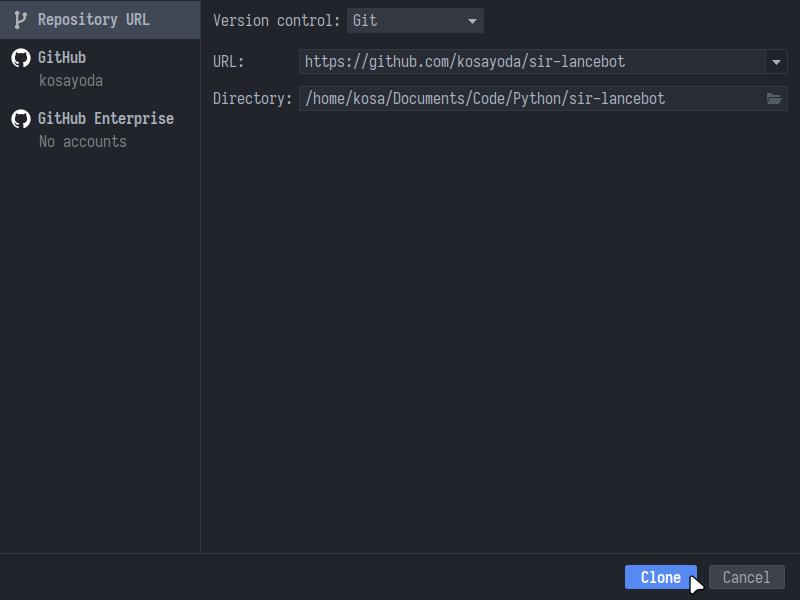
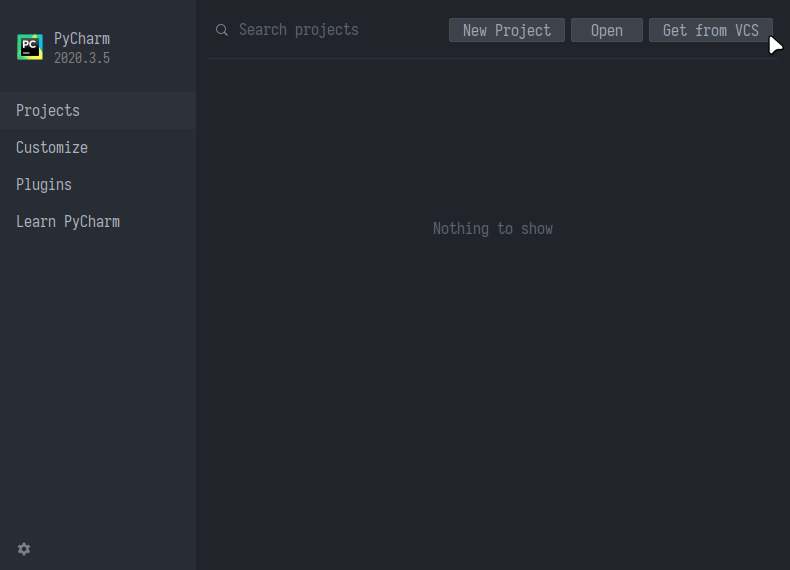
- Load up PyCharm and click
Get from VCS.
- Enter the URL of your forked repository.
- Change the directory if you desire and click
Clone.